
Related Stories



Share this article
QBCS · AI in Retail
AI Assistant for ERP
Your systems already hold the answer. Now your team can just ask for it and have the work done.
Ask a merchandiser what they do in their average work week and you will rarely hear “strategy”. You will hear about working through many screens doing menial work: checking stock at one store, then another, building a transfer, chasing a shortage on a delivery, marking down the eight units of a line that stopped selling in March, pulling the same report every Monday morning because someone needs it by ten, etc.
None of that is hard. All of it consumes a lot of time, and there is an enormous amount of it.
Over the past year we set out to accelerate it. The result is our AI Assistant for ERP — an agent that sits on top of a retailer’s merchandising solution, and by the same design on top of whatever else you run in your business, and actually executes retail business processes rather than talking about them. You say what you need. It does the work in the system of record, end to end, and tells you what it did.
What we have done
Our AI in retail investment program delivered its first production-grade AI assistant for retail ERP that covers close to 200 distinct merchandising operations across inventory, purchasing, pricing, item management, suppliers, stores and finance foundations.
That number matters more than it looks. A demo that can check a stock level is a party trick. An assistant that can check the stock level, decide the right source location, raise the transfer at the correct intercompany price, confirm the reservation on both sides and then export the audit trail to a file — that is a colleague.
And crucially, it does not replace anything. Your ERP stays exactly where it is, as a system of record and execution. The assistant works through the same interfaces your integrations already use, so every action it takes is a normal, auditable, fully governed transaction in your system of record.
It acts. It doesn’t just answer.
This is the distinction that matters most, and it is the easiest one to miss.
A chatbot bolted onto an ERP retrieves. Ask it about a purchase order and it reads one back to you. That is useful for about a week, until you notice that reading was never the slow part.
The ERP Assistant is an agent. Give it a goal and it works out which steps are needed, carries them out in order, checks the result of each one before moving to the next, and changes course when the system tells it something it did not expect. Raising the transfer, cancelling the open order balance, injecting the markdown, booking the receipt: these are actions taken in your system of record, executed and confirmed — not suggestions for someone else to key in.
That capability is exactly why the boundaries around it matter. Every user signs in as themselves, including the AI agent, and what the agent is allowed to do can be scoped to their role. A store manager who can raise a transfer request but not approve a purchase order. A buyer who can build orders but not change prices. An analyst who can read everything and change nothing. The agent inherits the permissions of the person asking, and never has more than they do.
10 jobs it takes off your team
These are not theoretical use cases. Each one is a working, multi-step workflow our AI assistant runs today.
And there is more. With close to 200 operations available to be combined in any order, the number of workflows that can be assembled from them is effectively endless — these ten were chosen because they are recognizable, not because they are the limit.
-
Rebalancing stock between stores, including across legal entities
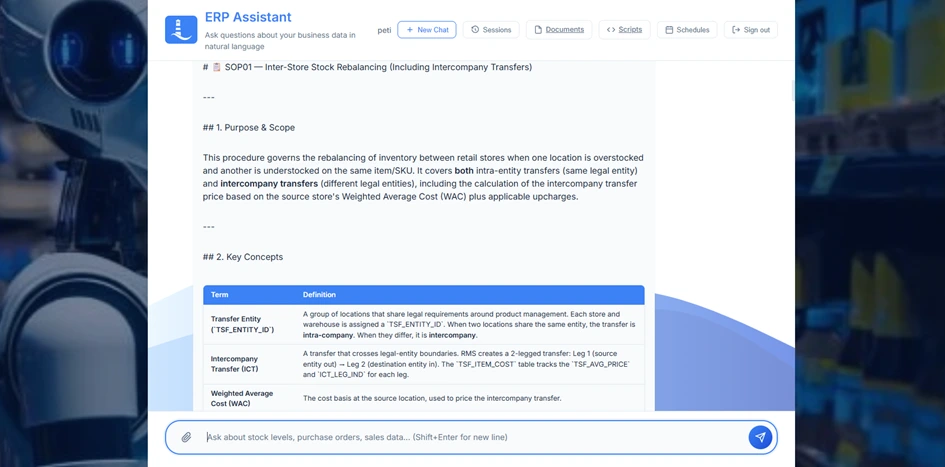
One store is drowning in a line, another has almost sold out. The assistant spots the imbalance, checks whether the two stores sit under the same legal entity, and raises the transfer. When they are in different entities it calculates the intercompany transfer price from the source store’s weighted average cost, applies your upcharge, and confirms the quantities are reserved at both ends before it reports back.
-
Quarantining defective stock and returning it to the vendor
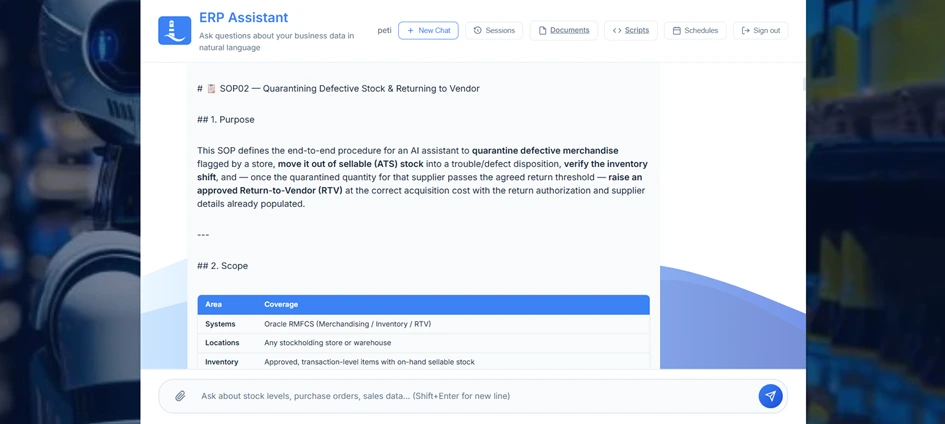
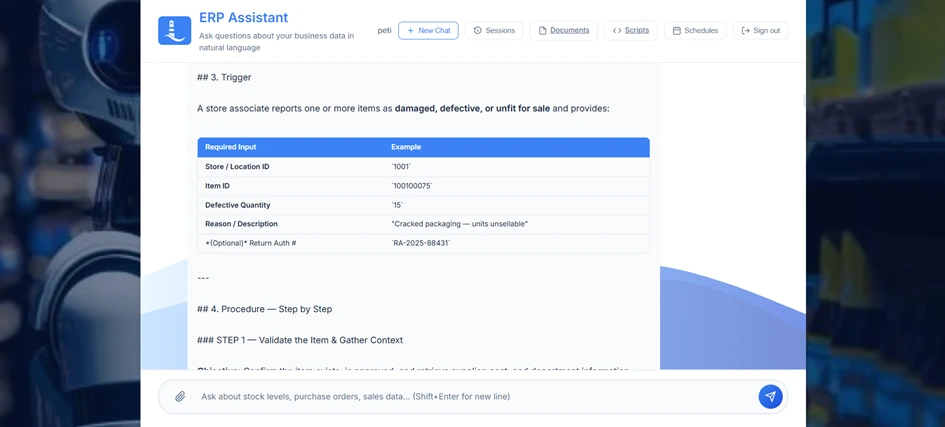
A store flags damaged goods. The assistant moves that quantity out of sellable stock into a defect bucket, verifies the stock actually shifted, and once the quarantined quantity for that supplier passes the agreed return threshold it raises an approved return-to-vendor at the correct acquisition cost — with the return authorization and supplier site already filled in.
-
Auditing receiving shortages at warehouses and 3PL sites
A delivery arrives short. The assistant pulls the receiving adjustments, reconciles the received quantity against what was shipped and what was ordered, books the loss at the receiving location, and packages the discrepancy — item, container, quantity, value — as a vendor claim ready for your finance team. No more three-way reconciliation by spreadsheet.
-
Clearing out stock that has stopped moving
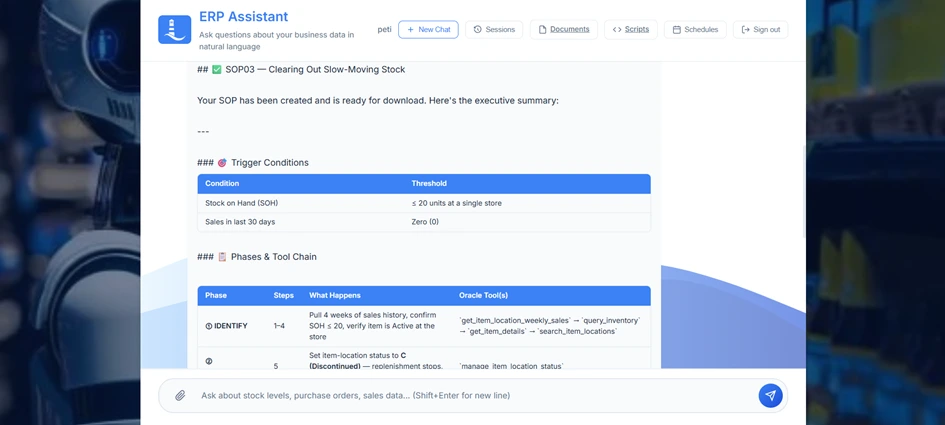
Twenty units left at one store, nothing sold in thirty days. The assistant identifies the item-location combinations that fit the pattern, discontinues the line at that store so no further orders can be placed against it, then injects the clearance markdown into your pricing engine to flush the remainder. The store keeps selling; the buying stops.
-
Building import orders with true landed cost
Import buying is where margin quietly disappears. The assistant creates the order in worksheet status, layers on the non-merchandise costs — freight by container volume, port handling, agent fees — assigns the correct tariff codes, calculates the duties, and only then presents the fully landed cost for approval. The buyer approves a real number, not an estimate that will be wrong by the time the container lands.
-
Absorbing promotional demand spikes into replenishment
A promotion is coming and the replenishment engine does not know yet. The assistant injects the additional demand for the affected weeks, audits what is already on order for that subclass so nobody double-buys, and drafts the replenishment order. It stops at worksheet status and hands the buyer a decision, rather than committing spend on its own.
-
Putting a failed supplier on hold and unwinding the exposure
A supplier fails a quality or ethical audit. The assistant retrieves every open order with that supplier, reverts approved orders back to worksheet, and cancels the outstanding balance. Where an order has already been partly received it does not blow up the whole document — it trims the ordered quantity down to what was actually received and closes it cleanly.
-
Booking pre-season capacity and distributing it
Reserve a block of valid order numbers up front to secure supplier production slots, raise the blanket orders against them, then distribute the bulk quantities across your regional warehouses. The assistant also reads the active off-invoice deals for each item-supplier combination so the cost on the order reflects the deal you actually negotiated.
-
Fulfilling online orders when the local store is empty
The customer ordered, the store has nothing. The assistant checks neighbouring stores and regional warehouses in real time — using true availability, net of what is already reserved for other customers and returns — and routes a fulfilment transfer from wherever has genuine stock. If nothing is available anywhere, it swaps in the approved substitute item and raises the backorder record. The customer keeps their order instead of getting a refund email.
-
Launching promotions and keeping prices governed
Set up a promotion with its offers, conditions and rewards, push the price changes, and verify the resulting price at any item-location before the campaign goes live. Pricing errors get caught at set-up rather than at the till — and the assistant checks the response for silently rejected records instead of assuming a successful submission means a successful price.
10 reports, on demand, in seconds
The same assistant answers questions. Ask in plain language, get the data — and export it to a file with one more sentence.
These ten are illustrations rather than a menu. There is no fixed report catalogue to choose from: if your systems hold the data, the assistant can assemble the answer, filtered and grouped however you ask for it.
-
Future inventory position
What is inbound on purchase orders, allocations and transfers, and when it lands. The basis for available-to-promise dates and pre-orders.
-
Live sellable stock
Real, sellable availability across every store and warehouse, ready to power a store finder or a stock enquiry at the counter.
-
Store versus warehouse imbalance
A side-by-side view that surfaces the lines sitting in a warehouse while stores run empty.
-
Weekly sales and gross margin
Units, retail value, cost of goods, margin percentage and closing stock by item and location, week by week.
-
Returns to vendor and credit exposure
What has gone back, what was cancelled, at what cost, and what credit you are still owed.
-
Inbound receiving discrepancies
Every receiving adjustment by item, container and location, so shipping variances stop hiding in the noise.
-
Open orders with import tracking
Status, supplier, ship windows, import routing and the landed-cost components attached to each order.
-
Item ranging, cost and replenishment settings
Which items are actually ranged where, at what cost and retail, on which replenishment method. The report that explains why a store never gets stock.
-
In-flight stock movements
The live transfer pipeline with delivery dates, rush flags and approval status.
-
Catalogue attribute audit
Items with their user-defined and custom attributes, checked against the master attribute list, so your web catalogue and your ERP stop disagreeing.
One agent, every system
In all of the above examples, everything happens in one platform. That is where we started, because merchandising is where the volume of manual work is highest and the cost of getting it wrong shows up fastest.
But our design is not specific only to merchandising. The assistant is a thin layer of decision-making capability over a library of individual, tested operations, and an operation is simply a defined task against a defined system. Adding a warehouse management system, a CRM, a supplier hub, a product information system, transport planning or a finance platform follows exactly the same pattern that adding the two-hundredth merchandising operation did.
The value compounds as you go. Consider a question that spans systems: is this supplier’s delivery late, and has anyone told the customers whose orders depend on it? Nobody can run that as a report, because the answer lives in three places and no single team owns all three. One agent with reach into all of them answers it in a sentence.
That is the real destination. Not a smarter interface to one system, but a single operational layer across the estate you already own.
Two ways to use it
The capabilities are identical either way. Only the front door changes.
The AI Assistant user interface
A browser-based workspace with its own sign-in, conversation history, document library, saved routines and schedules. This is the option for merchandisers, buyers, store operations and analysts who want to work in plain language without leaving one place.
As an MCP server
The same capability set is also published over the Model Context Protocol, so any AI tool your organization already uses can call it directly — Glean, Cursor, Visual Studio Code, ChatGPT, Claude Code, or whatever comes next. Your developers get merchandising operations inside their editor. Your knowledge platform answers stock questions from the same source of truth as your buyers. Nobody is asked to adopt yet another tool to get the benefit.
That matters more than it sounds. Most enterprise AI programs fail on adoption rather than capability: the tool is genuinely good and nobody opens it. Meeting people inside the software they already have open removes that problem entirely.
Built for daily operations
Any request the assistant can handle can be put on a timer — hourly, daily, weekly, or a one-off at a set date and time. That is how the Monday morning report writes itself.
Frequently used workflows can be saved as parameterized scripts and handed to colleagues as a simple form. They fill in a location and a date; the routine does the rest.
Upload your policies, process manuals and supplier agreements. The assistant searches them and cites the source and page when it answers, so decisions reference your rules rather than generic best practice.
Ask for an export and you get a downloadable file, ready for the meeting.
Every user has their own account, their own conversation history, and a complete record of what was asked and what was executed.
How it works
Our solutions connect to the systems you already run: retail ERP platforms such as Oracle’s Retail Cloud Merchandising Solution, and equally warehouse management, CRM, supplier and finance systems, using JSON REST APIs and, where needed, the application’s own user interface, to execute business functions, gather the input data for decisions, and verify the results.
The architecture behind that sentence is what makes it dependable. Large language models are excellent at understanding intent and terrible at doing the same arithmetic identically a thousand times in a row. So we do not ask them to. The AI decides what should happen and in which order. The actual work — every calculation, every transaction, every validation — is carried out by deterministic code that behaves the same way every single time.
Chain five probabilistic steps together and reliability collapses. Chain five deterministic steps under intelligent direction and it does not.
Two more principles matter as much as the architecture.
Nothing irreversible happens quietly. Purchase commitments, cancellations and price changes are surfaced for human approval. The agent prepares the decision; a person makes it.
Everything is auditable. Because the assistant works through the same interfaces as your existing integrations, every action lands in your systems as a standard, traceable transaction — attributable to a named user, visible to your controls, subject to your approval hierarchy.
What changes
Not headcount. Attention.
The work described above still has to happen every day in every retail business on earth. The question is only whether experienced merchandisers spend their week doing it by hand, or spend it deciding which lines to back, which suppliers to grow, and where the next season’s margin is going to come from.
Automating the mechanical layer of retail operations is one of the few genuinely large, genuinely available cost opportunities left — and unlike most transformation programs, it does not require replacing anything you already own.
How can I learn more?
Contact us to learn more about how our solutions can save you millions on cost while optimizing your business performance reliably, autonomously and at enterprise scale.
Going to NRF? Meet us at the show in New York from 11–13 January and discuss your specific needs with our experts.
Every workflow and report on this page was verified against the running AI Assistant for ERP codebase and a live Oracle Retail Merchandising solution before publication.